
01
Two options, every time
Audition A and B at aligned hit points. Favourite a take, ask for more like it, or choose a wilder direction.
 IMPACT STUDIOGet it · $29.99 ↗
CINEMATIC SOUND DESIGN · FOR MAC
The build. The impact. The aftermath.
A whole sound-design studio, right on your Mac.
WELCOME TO YOUR NEXT SIGNATURE SOUND
FROM AN IDEA TO AN IMPACT
Describe the feeling. Generate two interpretations. Pull apart the layers, shape the energy, and take the finished sound into your session.
MEET YOUR NEW INSTRUMENT
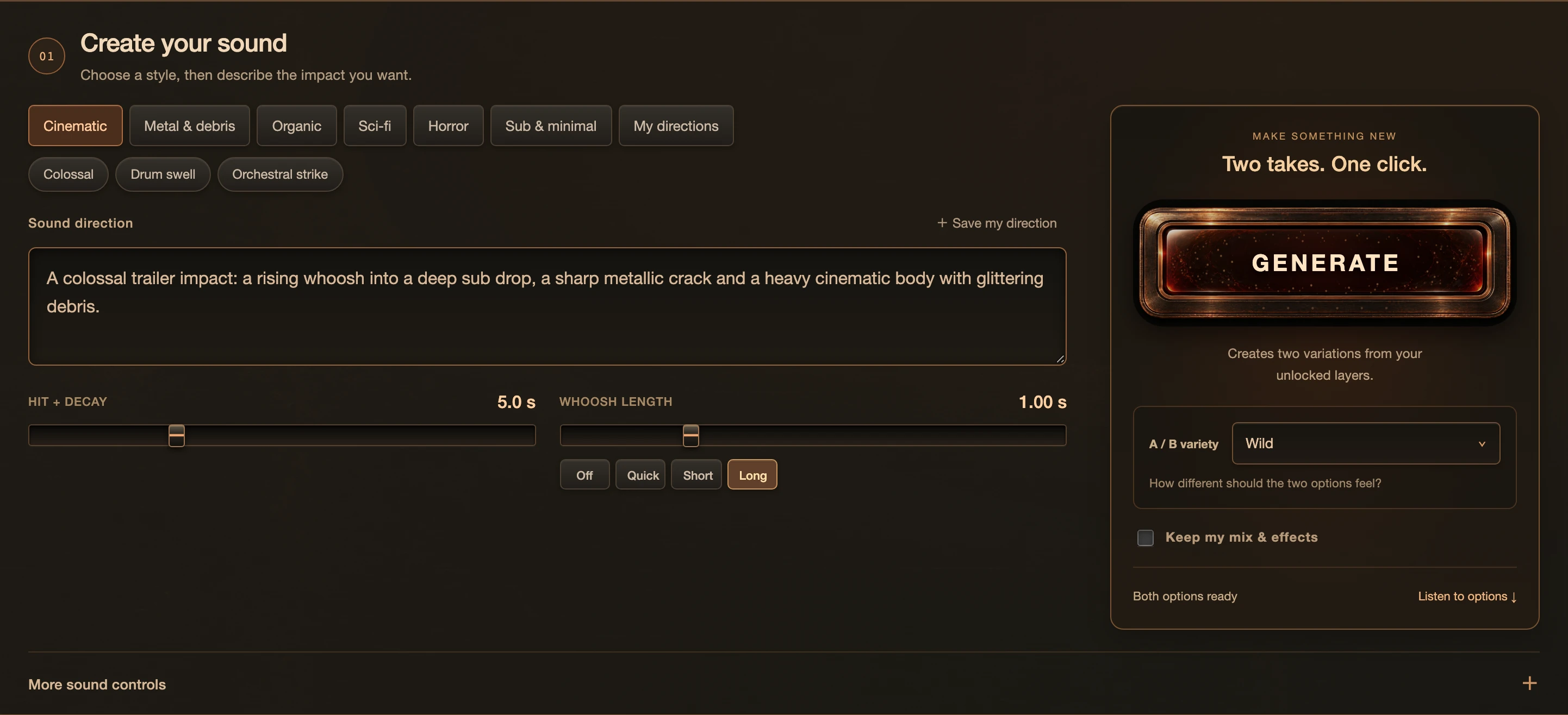
Pick a style, describe the moment in your own words and generate two complete interpretations with one click.
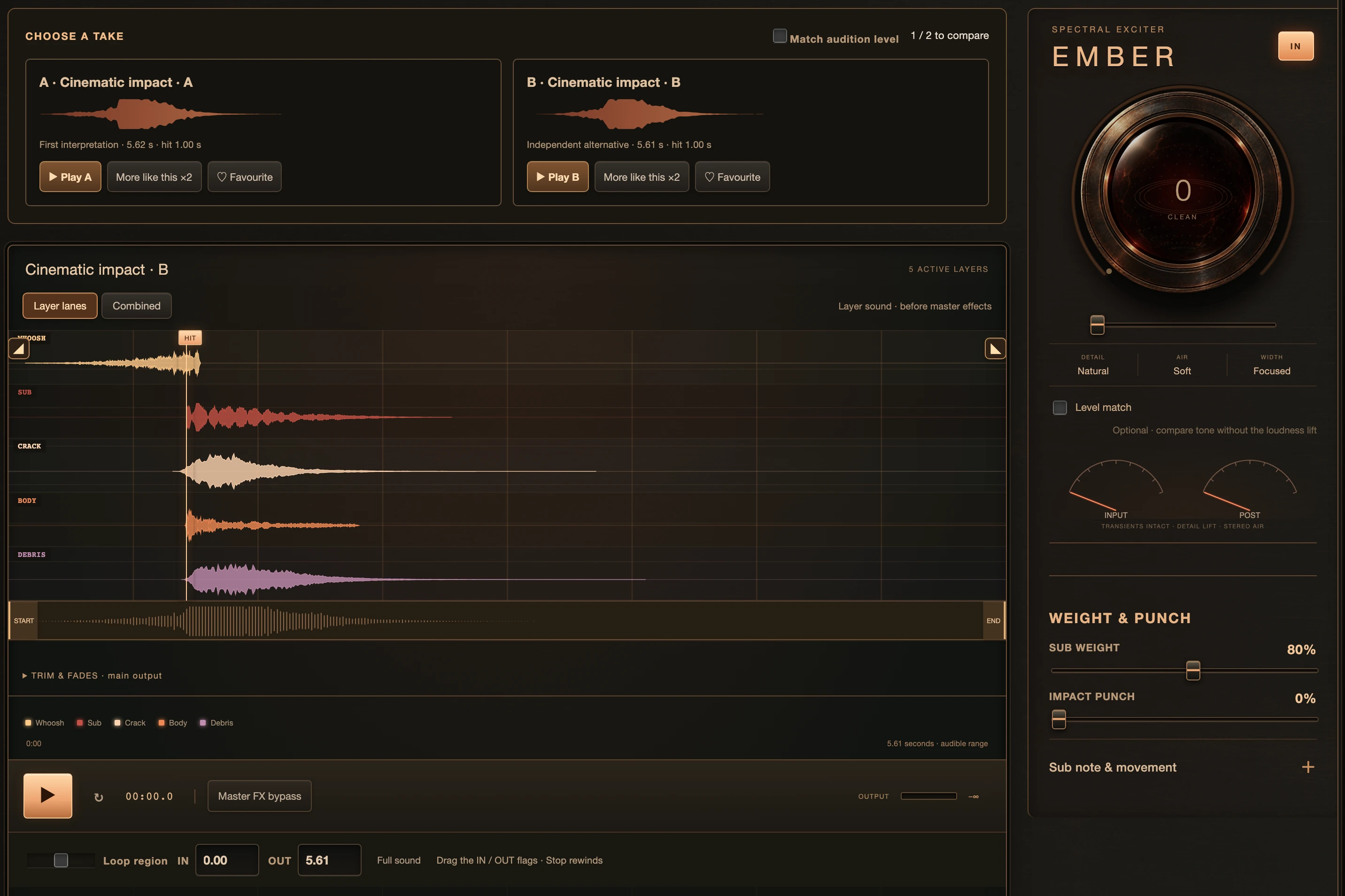
Compare A and B at the same hit point. Every layer has its own lane, level, timing and tone, with Ember for heat.
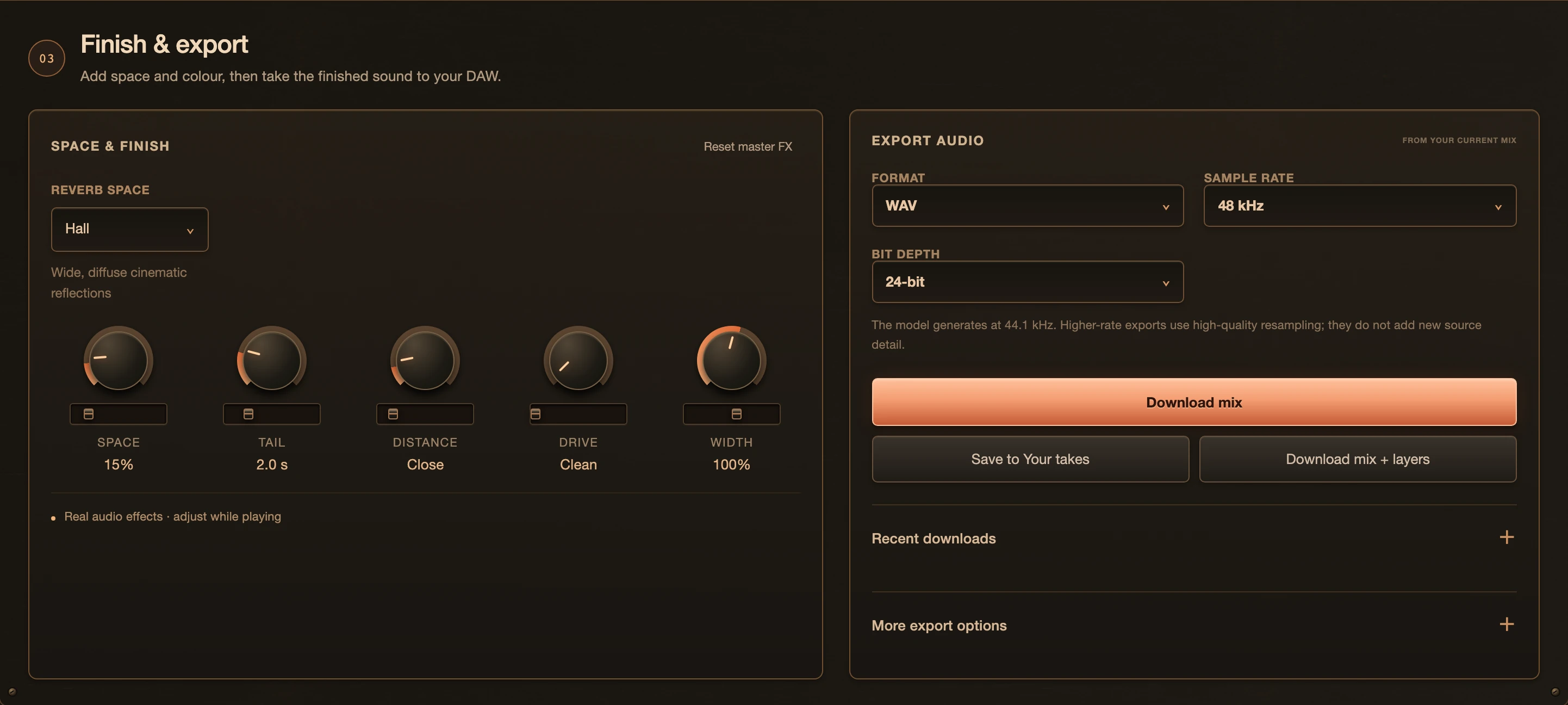
Add space, tail and width. Export WAV, AIFF, FLAC or MP3, as the full mix or all five aligned layers.
FIVE LAYERS. ONE VISION.
Independent sound sources, each with its own waveform, timing, pitch, fades, EQ and space. Keep the layers you love. Regenerate the rest.
CRACK CONTROLS
Give the moment a sharp, physical edge.
SCROLL TO TURN UP THE HEAT
MEET EMBER
Open up the detail. Give it air. Feel the weight.
One expressive control brings your impact to life.
THE FILM
One minute with Impact Studio, from the first prompt to the finished hit.

A one-minute film with music. It shows Impact Studio on a Mac: typing a prompt, generating two takes, shaping five layers around one hit, heating the sound with Ember, rebuilding a recording and placing the result in a session.
HEAR IT IN ACTION
Each sound was made start to finish in Impact Studio from the prompt shown: generated, layered, shaped with Ember and finished in the app, then exported. Nothing was added afterwards.
00.00/ 06.46 s
HIT at 1.00 s
PROMPT as typed into Impact Studio
A colossal hybrid trailer slam. One thunderous sub impact, a sharp gritty crack and a dense cinematic body fading into a long dark hall tail.
Levels matched and silence trimmed for this page. Otherwise exactly as exported.
NEUROENGINE · RECONSTRUCTION
Bring your own recording. Explore a new shape, texture and movement.
The whole transformation happens on your Mac.
Shape the attack, decay, pitch and texture. Save it. Or explore further.
STAY IN THE CREATIVE FLOW
Audition A and B at aligned hit points. Favourite a take, ask for more like it, or choose a wilder direction.
Bring in folders, search your sounds, organize takes and save the versions worth keeping.
Move the hit, adjust the whoosh, draw movement curves and smooth the edges with fades.
Audio generation and editing run locally. Your source recordings stay on your machine.
Drag a prepared WAV to your DAW or desktop. Export the full mix or the five aligned layers.
WAV, AIFF, FLAC or MP3. Choose your sample rate and bit depth for the next step in your workflow.
LIBRARY · MY SAMPLES
Add your sample folders and Impact Studio sorts what’s in them into whooshes, risers, subs, cracks, hits and debris, going by the folder, the file name, its metadata and the sound itself. You can search and filter them and keep favorites. Click where a hit really lands and that becomes its sync point. Press Build and it layers your own sounds into two takes, with every layer lined up on the HIT. Each whoosh keeps its own rise.
AGENT ACCESS · MCP
Impact Studio has an MCP server built in. Turn on Agent access, and an AI app on your Mac, like Claude Desktop, Claude Code or Cursor, can make impacts and export them for you. Give it the cue times from your edit and it hands back one full-length WAV with every hit on its timecode, a clip for each cue, and Resolve markers or an EDL if you ask. Say “make it bigger, add more reverb” and it saves a new version next to the original.
BUILT AROUND YOUR MAC
Impact Studio is a standalone Apple Silicon app. Install it, activate your license, and prepare the sound engine once if you want AI generation.
Compatibility targets below. Tested during development on an M3 Max with 128 GB unified memory; generation time varies by Mac, sound length and settings.RECOMMENDED SETUP
Apple Silicon16 GB is the minimum target. Allow more memory and storage for larger training projects. Internet is needed for activation, and for the engine download if you use AI generation.

YOUR NEXT SIGNATURE SOUND STARTS HERE
One purchase. Your studio.
A FEW THINGS WORTH KNOWING
Impact Studio is a standalone Mac app with an instrument-style interface. It does not load as an AU or VST plugin. Export or drag your finished audio into your DAW.
No. Generation, reconstruction, analysis and editing run locally on your Mac. Impact Studio does not send your recordings, prompts or generated audio to a cloud AI service, and no online AI subscription is required. If you connect a cloud AI app through Agent access, that app sees the text it sends and gets back, such as directions and take names. Your audio stays on your Mac.
Yes, once you have activated the app and, if you use AI generation, downloaded the sound engine. Internet is used for purchase, activation, license checks and license recovery, plus that engine download. Those connections do not upload your audio or prompts.
Yes, from version 1.3. When you set up the app, choose “Only my own samples — no AI” and skip the 9.8 GB engine download. Add your sample folders in Library › My samples and they’re sorted and searchable right where they are. Then press Build and it layers your own sounds into two takes, with every layer lined up on the HIT. If you want AI later, add the engine in Settings › AI generation.
Yes, from version 1.2. Turn on Settings › Agent access, and any MCP app on the same Mac, including one that runs a local AI model offline, can create impacts, export them and place hits to picture from a cue sheet. There is no extra fee or API charge from us; your AI app may have its own costs. Read the guide for your AI app.
Impact Studio’s license permits commercial use in music, films, trailers, games, advertising and client projects, subject to the license, the included engine terms and applicable third-party rights. We charge no royalty per sound or project. This permission does not guarantee exclusive ownership, copyright protection or clearance of every output. Check your publisher’s or client’s AI policy and the permissions for anything you import. Selling or sharing the sounds as sample packs or sound libraries remains prohibited under the license. Read the full terms.
Impact Studio uses Stability AI’s Stable Audio 3 Medium through its optimized Mac implementation. Stability publishes the model’s technical information and pre-training data description. Those documents describe the foundation model; they are not an independent rights-clearance certificate for each generated sound. Read Stability’s model card.
Stability reports licensed AudioSparx recordings and Freesound recordings under CC0, CC BY and CC Sampling+. Its model card describes screening and removal of identified copyrighted material, and links to training-data attributions. These are the provider’s published statements. They do not establish that Impact Studio independently verified every uploader’s authority to license a recording. Read Stability’s training-data description.
A valid Creative Commons license can provide permission for AI training without a separate agreement with each creator, where the license permits the use and its conditions are met. A Creative Commons label alone does not prove that an uploader held the necessary rights. Attribution and other conditions still matter, and CC Sampling+ has additional restrictions. How conditions apply to a particular model or output depends on the rights and use involved; commercial-use permission is not a blanket clearance guarantee. Read Creative Commons’ guidance.
Use reconstructed results commercially only when you own the input recording and have the rights to any material it contains, or have explicit permission covering reconstruction and your intended commercial use. Reconstructing or changing a copyrighted recording does not remove the original rights or make it automatically royalty-free. Buying a copy of a recording is not the same as owning its copyright. Read the full terms.
Yes. Import your own audio, organize your sample folders in My samples, use recordings as layer sources, or explore them in Reconstruction. Use audio you own or have sufficient rights to use for the specific purpose. Impact Studio provides usage guidance but does not automatically verify ownership of imported recordings.
Use recordings you own the necessary rights to, or have permission to use for AI training. A standard license to use a sample in music does not necessarily permit training or reconstruction. Those processes do not remove existing rights, and a result may remain close to the source. Check both the source permissions and the intended use of the result. Read the full terms.
Commercial-use permission is different from exclusive ownership, copyright protection and third-party clearance. Local generation and source records can help explain how a sound was made, but they are not an independently verified chain of rights or a publisher clearance certificate. If your agreement excludes AI-generated audio or requires assurances you cannot substantiate, do not deliver generative output under that agreement. Read the full terms.
The provenance update includes signed Content Credentials for WAV, FLAC and MP3, a signed annotation for AIFF, export records and free local verification. This metadata marking leaves the audio samples unchanged. Included from version 1.1.1. Earlier exports are not retroactively marked. See the rights page for how verification works. Read about export provenance.
Each generation starts with a new interpretation. Compare two takes, change the direction, choose a variation range and lock the layers you want to keep. Results vary and may need editing.
Each sound has its own session rate: 44.1, 48, 88.2, 96 or 192 kHz. New sounds start at 48 kHz, and export starts at the session rate and converts cleanly to other rates. Your own recordings stay untouched when the session runs at their rate, so a high-resolution recording keeps its top end when pitched down. Generated layers are made at 44.1 kHz and converted once; a higher rate does not add detail to them.
Your license code appears right after checkout and in your purchase email. Enter it in the Mac app to activate. Each license is for one named owner on up to two Macs, and the app shows the owner’s first and last name. License codes may not be shared, transferred or resold. Read the full terms.